ARKSlayer Pro Guide
A comprehensive guide to ARKSlayer Pro covering setup, GUI options, gear progression, quest requirements, and goldfarming.
In This Guide
ARKSlayer Pro Guide
A comprehensive setup guide for the optimal Slayer botting experience with ARKSlayer Pro.
Why Slayer?
Slayer is one of the most rewarding skills in OSRS - and one of the most rarely seen at 99. It demands time and dedication, and few scripts on the market offer full automation. ARKSlayer Pro changes that.
Players train Slayer for three main reasons:
- Enormous profit potential - high-level Slayer monsters are among the best money-makers in the game
- Very high combat XP rates - the Slayer helmet damage boost, Dwarf Multicannon support, and multi-combat tasks let you rival NMZ XP/hour
- The Slayer cape - a prestigious achievement that demonstrates dedication
ARKSlayer Pro brings all of this within reach - fully automated, with intelligent antiban and anti-profiling built in from the ground up.
Script Features
ARKSlayer Pro is a fully automatic Slayer trainer that handles every aspect of the skill.
Slayer Master Support
- Turael - No combat requirement, start from level 3
- Vannaka - 40 Combat required, mid-level tasks
- Chaeldar - 70 Combat required, fairy rings recommended
- Nieve / Steve - 85 Combat required, high-level tasks
- Duradel - 100 Combat, 50 Slayer, Shilo Village quest
- Point-Boosting mode - 9 Turael tasks then 1 other master task for maximum Slayer Points/hour
- Free Farming mode - Kill any supported monster off-task for pure XP or GP farming
Autonomous Operation
- Travels to and from tasks, completes them, and gets new tasks - no human input needed once configured
- Supports the Dwarf Multicannon with placement, projectile tracking for reloading, retrieval, and repair (including from Nulodion)
- Automatic Dusty Key acquisition for Blue Dragon tasks
- Full Grand Exchange and Slayer Shop restocking - buys whatever supplies you need
- Argument loading to start with a saved profile without opening the GUI
Banking
- Supported locations: Varrock West Bank, Edgeville (via Glory or POH), Ferox Enclave (via Ring of Duelling + pool restoration), Crafting Guild, Castle Wars, Farming Guild
- POH integration: jewellery box, mounted glory, mounted Xeric's Talisman, mounted Digsite Pendant, restoration pool
- Ironman banking - uses runes and low-level jewellery
Combat & Gear
- Advanced combat system with human-emulated behaviour
- Full Auto-Gearing - automatically generates and progressively upgrades gear loadouts based on budget and combat style
- Supports Melee, Ranged, and Magic combat with automatic style switching
- Special attack weapon support with intelligent usage (Dragon Claws, Voidwaker, Armadyl Godsword, Burning Claws, and 50+ more)
- Multi-target magic (barrage/burst) with baiting weapon support and automatic spellbook switching via POH altars or house party worlds
- Automatically executes special kill moves on relevant tasks (Rockslugs need salt, Desert Lizards need ice, Gargoyles need a rock hammer, etc.)
- Automatically switches equipment for task-specific requirements (Mirror Shield, Leaf-Bladed weapons, face mask, nose peg, earmuffs, etc.)
- Prayer support with protection prayers, combat prayers (Piety/Rigour/Augury), custom per-task prayer assignments, and prayer potion management
Looting
- Optimised looting system with task-specific loot lists
- Ironman loot table - prioritises useful resources
- Loot-above-value filtering (customisable GP threshold)
- Max XP mode - only loot high-value items
- Only-loot-our-drops mode to avoid anti-bot traps
- High Level Alchemy casting on optimal items
- Support for Herb Sack, Seed Box, Gem Bag, Bonecrusher, Ash Sanctifier, and Soul Bearer
- Supports Esc key closing for interfaces
Task Management
- Intelligent task selection using weighted location pools - picks the best available variant for each monster
- Automatic task-skipping using Slayer Points when an unsupported or unwanted task is assigned
- Custom task-skipping and blocking via the GUI
- Turael-skipping fallback when Slayer Points run out
Progression
- Progressive levelling - train combat skills in a custom order (e.g. Strength → 99, then Ranged → 99, then Attack → 99, etc.)
- Progressive reward purchasing - automatically unlock and extend Slayer rewards in order (Bigger & Badder, Slayer Helmet, task extensions, etc.)
Automation
- ARKMule integration for wealth transfer
- Automatic re-bonding
- Discord webhook notifications for high-value drops, script stops, and muling events
- Automatic loot selling at the Grand Exchange
- Automatic equipment purchasing
Anti-Profiling & Safety
- Multi-method anti-profiling system - every action can be executed through multiple different code paths to prevent repetitive pattern detection
- Hyper-Human Mode - AI-powered humanisation with contextual awareness, intelligent idle behaviour, and adaptive patterns
- Circadian Breaking - simulates daily routines (bathroom, meals, sleep) for 24/7 operation
- Intermittent micro-breaking, player fatigue simulation, and Hyper-AFK mode
- Automatic world-hopping if spoken to or when too many players are in the area
- Advanced deathwalking system to recover items after death
- Repeated-action failsafe detection and automatic recovery
- Seeded stopping condition levels for unique per-account patterns
Before Running the Script
Slayer will take you all around the OSRS map. Complete these steps before starting:
1. Choose Your Slayer Master
Select your Slayer Master in the Core tab. The script can auto-select the best master for your account, or you can pick one manually.
| Master | Requirements | Location |
|---|---|---|
| Turael / Aya | None (level 3 friendly) | Burthorpe |
| Vannaka | 40 Combat | Edgeville Dungeon |
| Chaeldar | 70 Combat | Zanaris (requires Lost City) |
| Nieve / Steve | 85 Combat | Gnome Stronghold |
| Duradel / Kuradal | 100 Combat, 50 Slayer, Shilo Village | Shilo Village |
2. Choose Your Banking Method
Select a banking method in the Core tab. Have the required teleport items ready:
| Banking Method | Items Required | Notes |
|---|---|---|
| Varrock Teletab → Varrock West Bank | Varrock teletabs | Simple, reliable |
| Amulet of Glory → Edgeville | Charged Amulet of Glory | |
| Ring of Duelling → Ferox Enclave | Charged Ring of Duelling | Includes pool restoration (HP, prayer, run energy) |
| Ring of Duelling → Castle Wars | Charged Ring of Duelling | Quick bank, no restoration |
| Skills Necklace → Farming Guild | Charged Skills Necklace | 45 Farming required |
| Crafting Cape → Crafting Guild | Crafting cape | 99 Crafting |
| POH → Jewellery Box | House teletab + Ornate Jewellery Box | Access to Edgeville, Ferox, Castle Wars, or Farming Guild |
| Ironman Banking | Law, Air, Fire runes | 45 Magic required (51+ recommended) |
3. Stock Your Bank
Your bank should contain:
- Teleport items matching your chosen banking method
- Coins for the Grand Exchange (if using GE restocking)
- Slayer gem - used to contact Slayer Masters (Slayer gem or Enchanted gem)
- Light source - for dark caves (Candle or Lantern)
- Tinderbox - required in many areas
- Task-specific items you already own (the script will buy what it can at the GE)
4. If Using Ranged
Make sure you have enough ammo for the entire script run. The script will stop automatically if it runs out.
5. Disable Client Plugins
If using a client with plugins, disable them before running ARKSlayer. Plugins can interfere with scripts in unexpected ways.
Optimal Quests & Requirements
These quests and items significantly improve your Slayer experience:
Dwarf Cannon
| Quest | Dwarf Cannon |
| Why | Cannoning adds 10k+ Slayer XP/hour. You break even on profit by ~70 Slayer and profit thereafter. |
| Additional items | Dwarf cannon set, Cannonballs |
Fairy Rings
| Quest chain | Priest in Peril → Nature Spirit → Lost City → Fairytale I |
| Why | Largest XP/hour increase after cannoning. Instant teleports to Slayer dungeons across the map. Almost mandatory for Ironmen. |
| Items needed | Dramen staff or Lunar staff |
Black Mask / Slayer Helmet
| Cost | ~750k gp (Black mask) |
| Why | 16.67% damage and accuracy bonus on-task. Makes Slayer combat XP rival NMZ. Imbue at the Nightmare Zone to also affect Ranged. |
| Upgrade | Purchase the Malevolent Masquerade unlock to combine into a Slayer helmet |
Protection Prayers
| Requirement | 43 Prayer |
| Why | Certain tasks are very difficult without protection prayers. Extends trips and increases XP/hour significantly. |
Special Attack Weapons
Budget option: Dragon dagger(p++) - cheap, effective, requires Lost City
Premium options: Dragon claws, Voidwaker, Armadyl godsword, Burning claws, and 50+ other supported weapons
Client of Kourend
| Quest | Client of Kourend |
| Why | Unlocks Zeah and the Catacombs of Kourend - efficient Slayer spots with passive prayer restoration via ancient ashes. |
Other Recommendations
| Quest / Item | Benefit |
|---|---|
| Fremennik Isles | Ice Trolls - massive XP |
| Horror from the Deep | Dagannoth tasks |
| Animal Magnetism | Ava's devices for Ranged |
| Shilo Village | Duradel access |
GUI Reference
ARKSlayer Pro's GUI is organised into 11 tabs. Hover over any option for a detailed tooltip. Read every tab that applies to your account before starting.
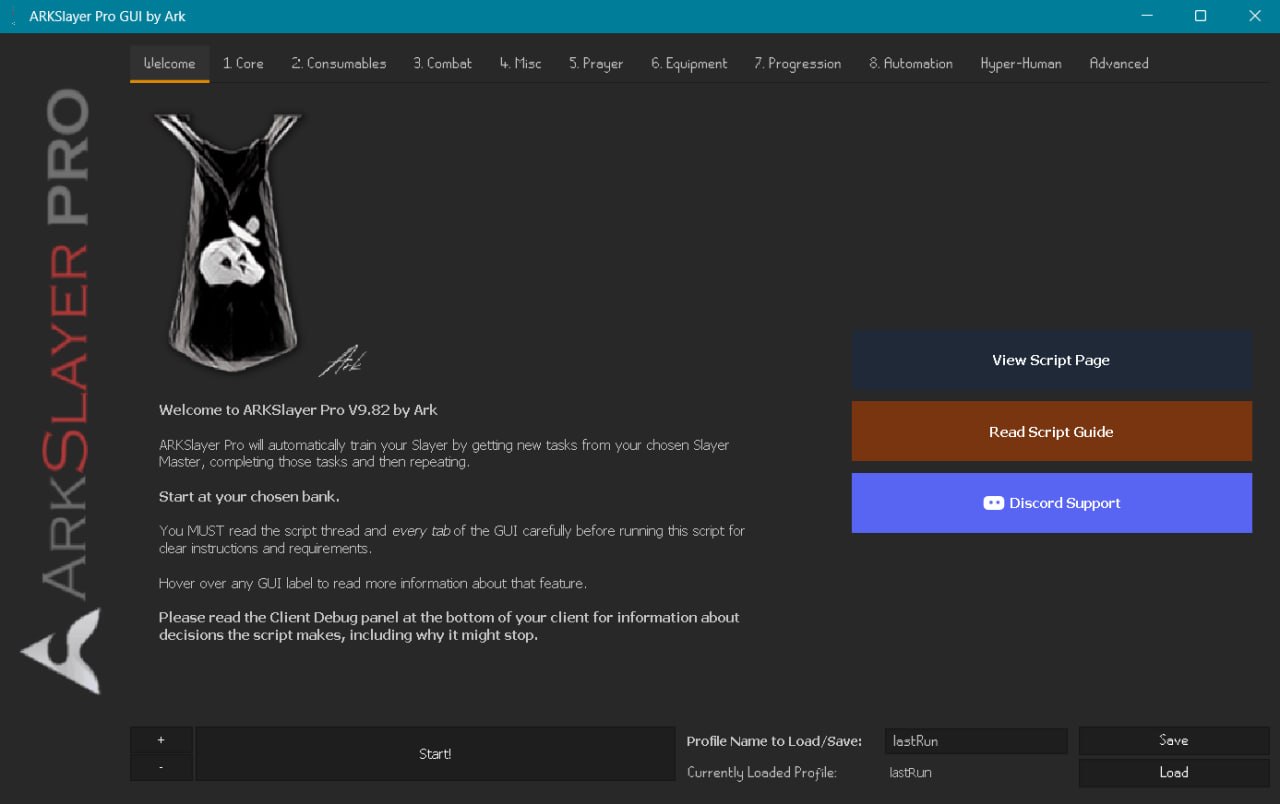
Welcome Tab
The landing page. The right panel provides quick links to the script page, the optimisation guide, and Discord support. The bottom bar allows profile management and starting the script.
Before you start:
- Configure every tab that applies to your account
- Save your profile once configured
- Click Start!
1. Core Tab
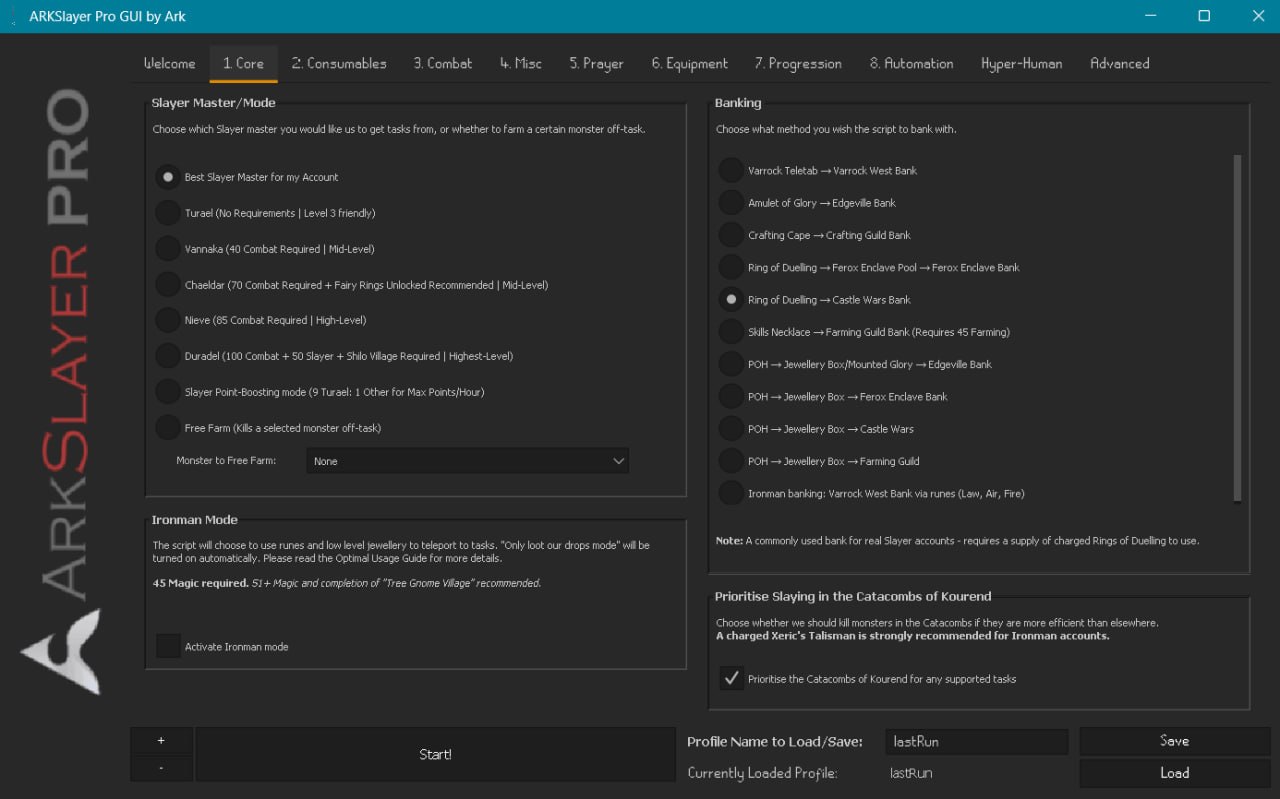
Controls which Slayer Master you use, your banking method, and Ironman mode.
Slayer Master / Mode (radio buttons, mutually exclusive)
| Option | Description |
|---|---|
| Best Slayer Master for my Account | Auto-selects the optimal master based on your combat level and quest completion |
| Turael | No requirements, level 3 friendly - lowest XP but fastest points for boosting |
| Vannaka | 40 Combat required - mid-level tasks |
| Chaeldar | 70 Combat required - fairy rings recommended for access |
| Nieve / Steve | 85 Combat required - high-level tasks |
| Duradel | 100 Combat + 50 Slayer + Shilo Village - best tasks for high-level accounts |
| Slayer Point-Boosting | 9 Turael → 1 high-level master, cycling for max points/hour |
| Free Farm | Kills a selected monster off-task indefinitely (56+ monsters supported) |
Banking (radio buttons, mutually exclusive)
| Option | How It Works |
|---|---|
| Varrock Teletab → Varrock West Bank | Uses teletabs from inventory or bank |
| Amulet of Glory → Edgeville | Equips and uses charged glory amulets |
| Crafting Cape → Crafting Guild | Requires 99 Crafting |
| Ring of Duelling → Ferox Enclave | Includes pool restoration (HP, prayer, run energy) |
| Ring of Duelling → Castle Wars | Quick bank, no restoration |
| Skills Necklace → Farming Guild | Requires 45 Farming |
| POH → Jewellery Box → Edgeville / Ferox / Castle Wars / Farming Guild | Uses POH as hub - requires house tab and jewellery box |
| Ironman Banking | Law/Air/Fire runes - requires 45 Magic |
What your banking choice affects: teleport items the script withdraws, route to return to tasks, and restoration options between trips. POH + Ornate Pool gives the fastest task cycling.
Ironman Mode
- Checkbox to activate ironman-specific teleport routing
- Automatically enables "Only loot our drops"
- 45 Magic required (51+ and Tree Gnome Village recommended)
Prioritise Catacombs of Kourend
- When checked, prefers Catacombs variants of supported tasks
- Catacombs offer passive prayer restoration via ancient ashes
- A charged Xeric's Talisman is strongly recommended for Ironmen
2. Consumables Tab
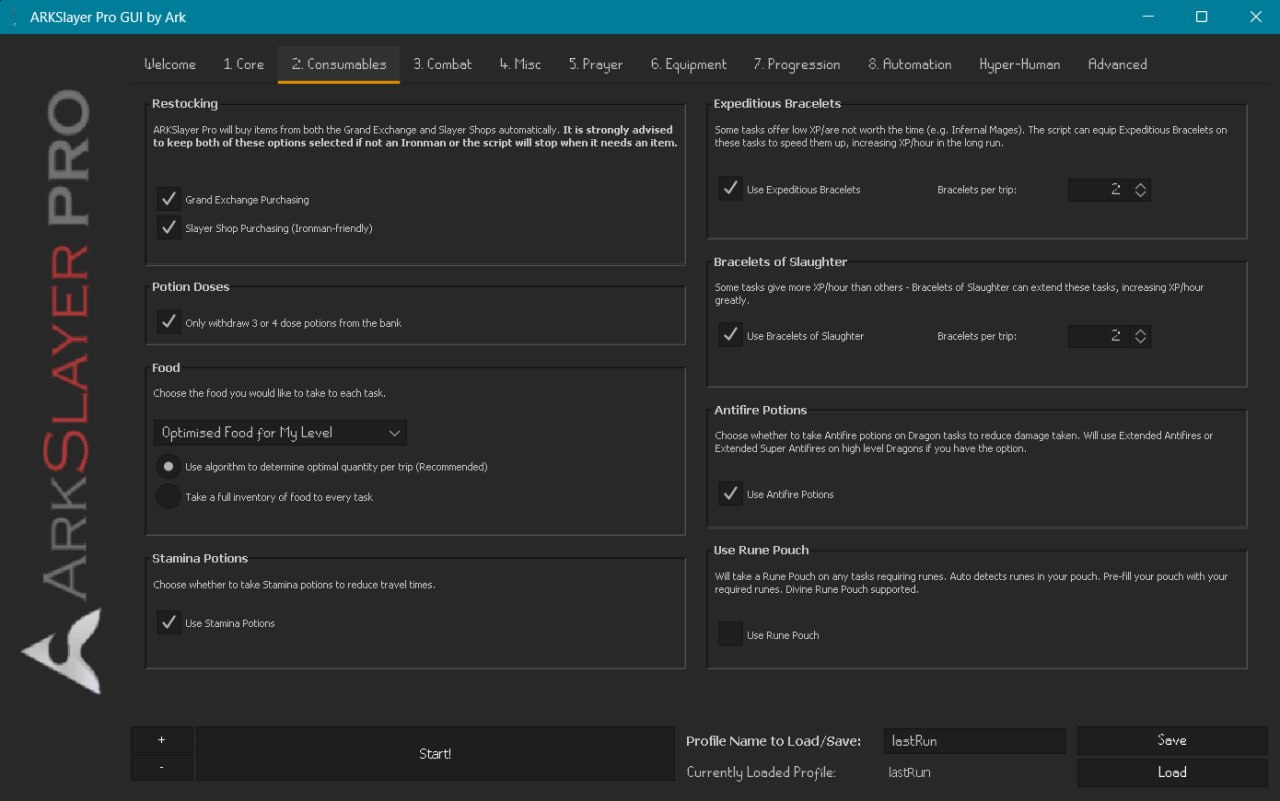
Controls restocking, food, potions, and bracelets.
Restocking
| Option | Default | Description |
|---|---|---|
| Grand Exchange Purchasing | ON | Buys needed items (food, potions, cannonballs, ammo) from the GE |
| Slayer Shop Purchasing | ON | Buys from Slayer Masters (broad bolts, slayer gems, etc.) - useful for Ironmen |
How restocking works: The script detects when it's running low on consumables, travels to the GE (or Slayer Master), purchases what it needs based on your settings, and returns to the task. Quantity is algorithmically determined.
Food
| Setting | Description |
|---|---|
| Food type | 38 options from Shrimp to Anglerfish, Dark Crab, and Moonlight Antelope. "Optimised Food for My Level" auto-selects the best for your HP level |
| Algorithm quantity (default) | Calculates food per trip based on task difficulty, defence level, and past performance |
| Full inventory | Always takes max food - simpler but less efficient |
Expeditious Bracelets (default ON)
- Speeds up low-XP tasks - bracelets degrade to nothing, making kills faster
- Set how many per trip (default 2)
- The script equips them automatically on suitable tasks
Bracelets of Slaughter (default ON)
- Extends high-XP tasks by delaying completion
- Set how many per trip (default 2)
- The script equips them automatically on high-value tasks
How bracelet assignment works: The script determines which tasks benefit from Expeditious vs Slaughter based on each task's XP rates and profit potential. No manual configuration needed.
Other consumables
| Option | Default | Description |
|---|---|---|
| Antifire Potions | ON | Extended antifires on dragon tasks |
| Stamina Potions | ON | Maintains run energy |
| Rune Pouch | OFF | Takes rune pouch on tasks needing runes |
| Potion Doses | 3/4 dose | Only withdraws full-dose potions |
3. Combat Tab
Controls combat settings including the Dwarf Multicannon, looting mode, special attacks, and superior monsters.
Dwarf Multicannon
When checked, the script sets up and uses the Dwarf Multicannon on tasks where it's beneficial. Includes:
- Cannon placement at optimal positions for each task area
- Projectile tracking for reload timing
- Automatic cannonball loading and repair
- Cannon retrieval from Nulodion if lost
The script decides which tasks benefit from cannoning based on task density and area layout.
Looting Mode (radio buttons, mutually exclusive)
| Option | Behaviour |
|---|---|
| Optimised Looting | Per-task loot lists - picks up items valuable for that specific monster |
| Ironman Loot Table | Prioritises useful resources (herbs, seeds, ores) over GP |
| Loot Only Items Over X GP | Only picks up items above a customisable GP threshold (min 100, default 3,000) |
| Max XP Mode | Minimises looting - only high-value items, maximises XP/hour |
Only Loot Our Drops (default ON for Ironmen)
- Only picks up items from monsters you damaged
- Prevents lure-based anti-bot traps
Superior Slayer Monsters
- Requires the Bigger and Badder perk
- When checked, engages superior monsters when they spawn - massive XP drops and valuable loot (Imbued Heart, Eternal Gem, etc.)
Imbued Heart
- When checked, uses the Imbued Heart on magic tasks
Special Attack Weapon
- Dropdown with 53+ weapons - Dragon dagger, Dragon claws, Dragon warhammer, Armadyl godsword, Voidwaker, Burning claws, and more
- The script uses the special attack when the special energy bar fills - timing is randomised for anti-profiling
4. Misc Tab
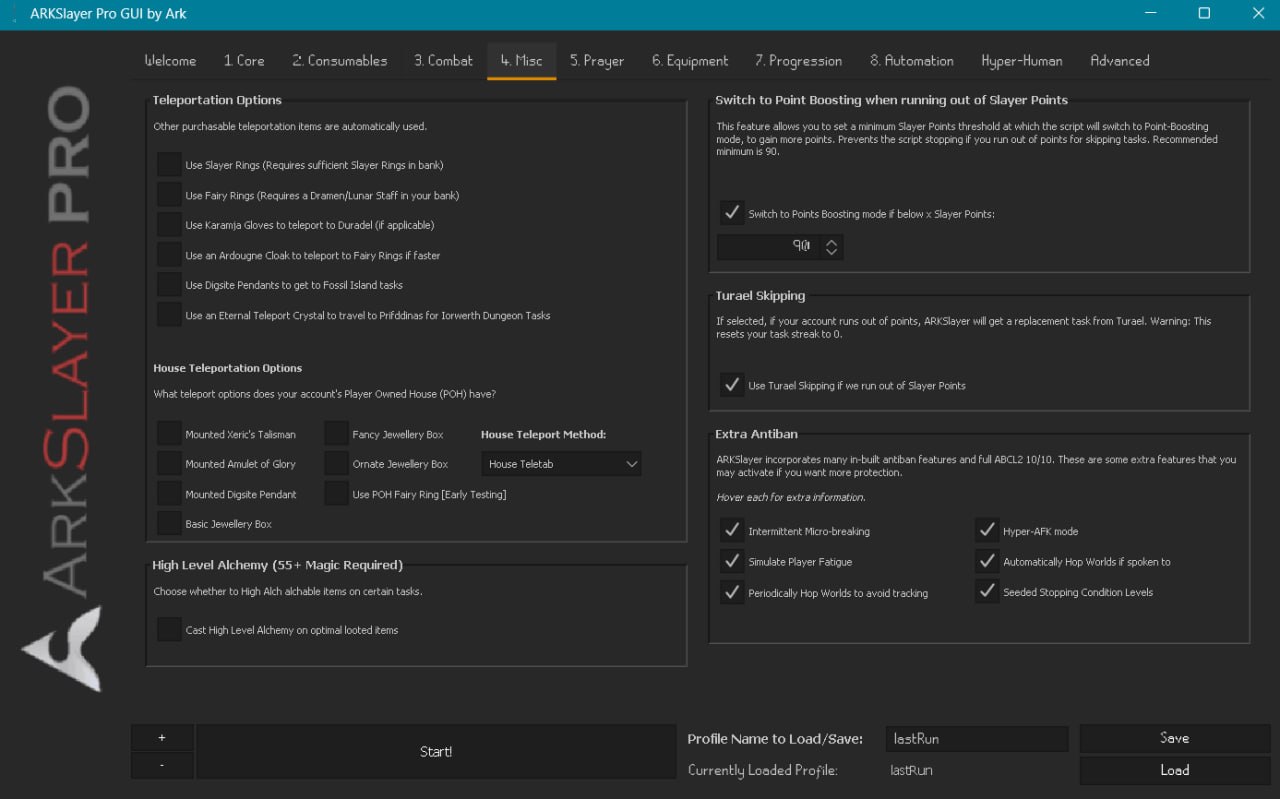
Controls teleportation, point boosting, and antiban features.
Teleportation Options (checkboxes, multi-select)
| Option | What It Does |
|---|---|
| Slayer Rings | Teleports to Slayer Tower, Fremennik Cave, etc. |
| Fairy Rings | Uses fairy ring network - requires Dramen/Lunar staff |
| Karamja Gloves | Teleports to Duradel in Shilo Village |
| Ardougne Cloak | Faster fairy ring teleport |
| Digsite Pendants | Teleports to Fossil Island for tasks there |
| Eternal Teleport Crystal | Prifddinas for Iorwerth Dungeon tasks |
How teleportation works: The script ranks all available options by speed, quest completion, and item availability, then chooses the fastest route for each journey.
POH Teleportation Options (checkboxes)
- Selected POH furniture: Mounted Xeric's Talisman, Mounted Glory, Mounted Digsite Pendant, Jewellery Box (Basic / Fancy / Ornate), POH Fairy Ring
- House Teleport Method: House Teletab / Teleport Runes / Construction Cape
Point Boosting
| Setting | Default | Description |
|---|---|---|
| Switch to Point Boosting below X points | 90 | Switches to 9 Turael : 1 high-level master to rebuild points |
| Turael Skipping fallback | ON | Uses Turael to cancel tasks when out of points (resets task streak) |
Extra Antiban
| Option | Default | Behaviour |
|---|---|---|
| Intermittent Micro-breaking | ON | Random short AFK breaks - simulates distraction |
| Simulate Player Fatigue | ON | Progressively slows reactions over time |
| Periodically Hop Worlds | ON | Changes worlds on a schedule to avoid long-term tracking |
| Hyper-AFK Mode | OFF | Longer waits between actions - simulates semi-AFK play |
| Hop if Spoken To | OFF | World-hops immediately when messaged by another player |
| Seeded Stopping Conditions | OFF | Generates unique stop levels per account |
High Level Alchemy (55+ Magic)
- Casts High Level Alchemy on items worth more alched than raw
5. Prayer Tab
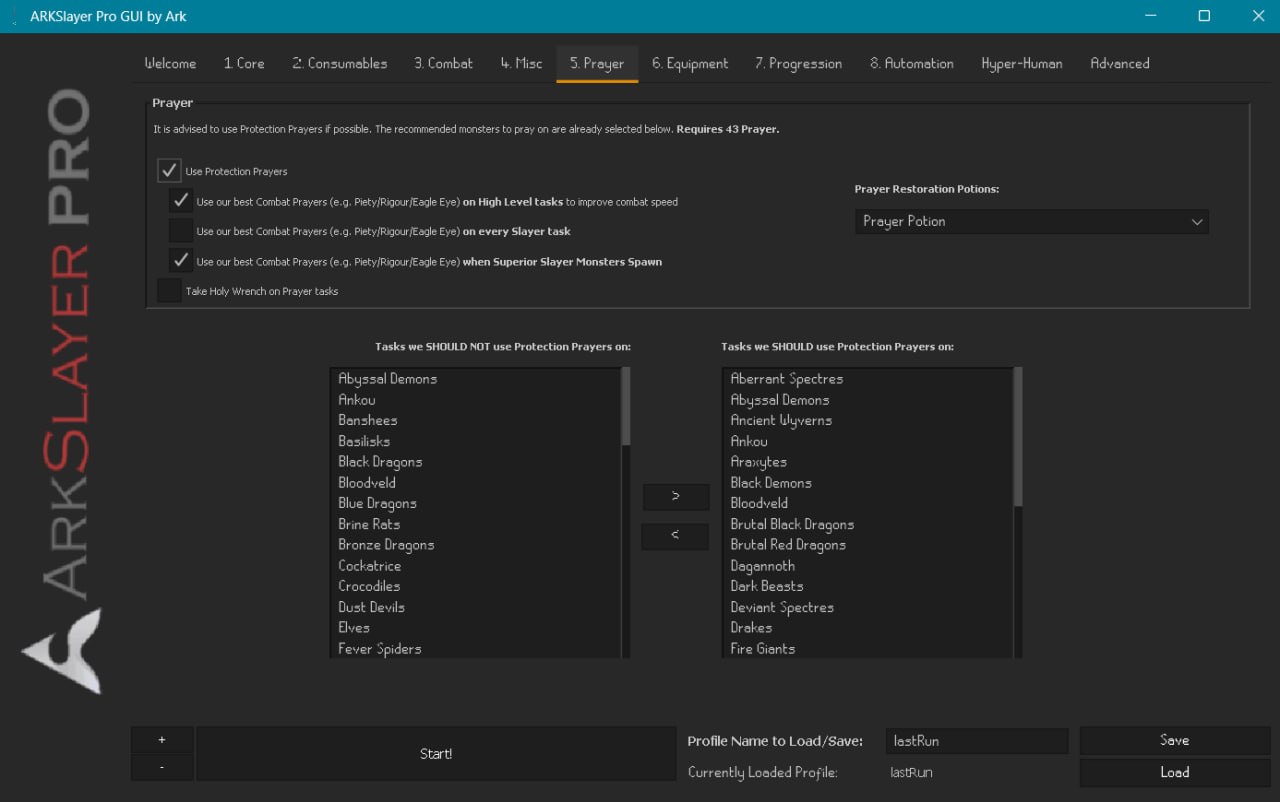
Controls protection and combat prayer usage.
Prayer Settings
| Setting | Default | Description |
|---|---|---|
| Use Protection Prayers | ON | Protects from magic/missile/melee where helpful |
| Combat Prayers on High-Level Tasks | ON | Uses Piety/Rigour/Eagle Eye on difficult tasks |
| Combat Prayers on ALL Tasks | OFF | Uses combat prayers on every task |
| Combat Prayers on Superior Monsters | ON | Activates best combat prayers on superior spawns |
| Take Holy Wrench on Prayer Tasks | OFF | Slightly better prayer point restoration |
Prayer Restoration Potions: Choose between Prayer Potion, Super Restore, Moonlight Moth, or Moonlight Moth Mix.
Per-Task Prayer Assignment
Two side-by-side lists let you control exactly which tasks use protection prayers:
| List | Contains | Use > / < to… |
|---|---|---|
| Left - Tasks NOT to pray on | Low-damage tasks (Bloodvelds, Ankou, etc.) | Move to right to add prayer |
| Right - Tasks TO pray on | High-damage tasks (Dark Beasts, Drakes, etc.) | Move to left to remove prayer |
Pre-populated based on each task's max hit and attack style.
6. Equipment Tab
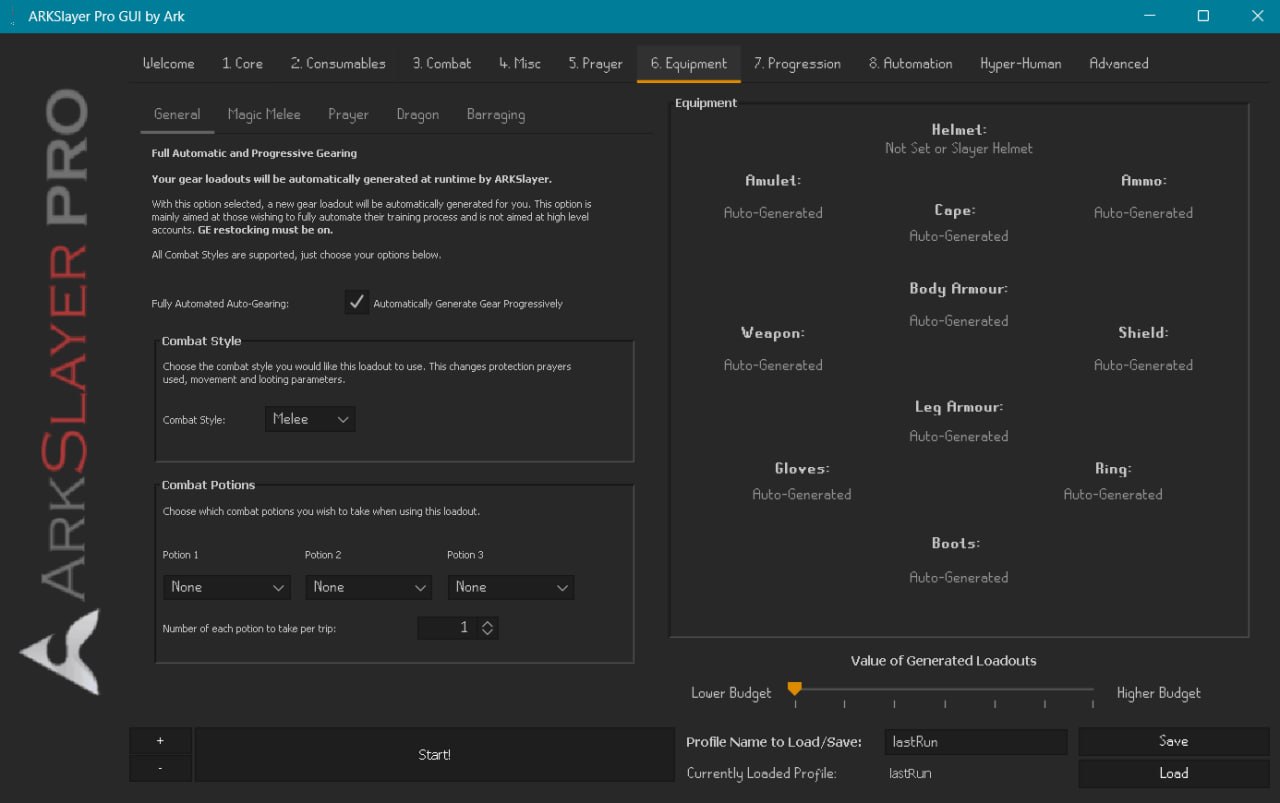
Controls gear and combat style. This tab has 5 sub-tabs.
General Sub-Tab
| Setting | Default | Description |
|---|---|---|
| Full Auto-Gearing | ON | Generates gear at runtime based on combat style and budget |
| Combat Style | Melee | Melee / Ranged / Magic |
| Spell (Magic only) | Auto-best | Specific spell from Wind Strike to Fire Surge |
| Combat Potions | None | 3 slots for Attack/Strength/Defence/Combat/Ranging/Magic/Divine variants |
| Special Attack Weapon | None | Shared dropdown with Combat tab |
Auto-Gearing budget slider: Controls the quality of generated gear - lower = basic gear, higher = best-in-slot within reason. When ON, manual equipment slots are disabled.
Additional Sub-Tabs
| Sub-Tab | Purpose |
|---|---|
| Magic Melee | Gear for tasks using melee with special weapons (leaf-bladed battleaxe on Kurasks/Turoths) |
| Prayer | Gear for prayer-focused tasks (Proselyte armour) |
| Dragon | Anti-dragon equipment for dragon tasks |
| Barraging | Multi-target magic setup: combat style (always Magic), barrage spell, baiting weapon (Iron-Rune darts), and spellbook switching method |
Spellbook Switching Methods (for Barraging)
| Method | Description |
|---|---|
| None (Stay on Ancients) | You must be on Ancient Magicks before starting |
| House Party World Altar | Hops to house party world, uses another player's altar |
| Own POH (Occult Altar) | Uses your POH Occult Altar |
| Own POH (Ancient Altar) | Uses your POH Ancient altar |
7. Progression Tab
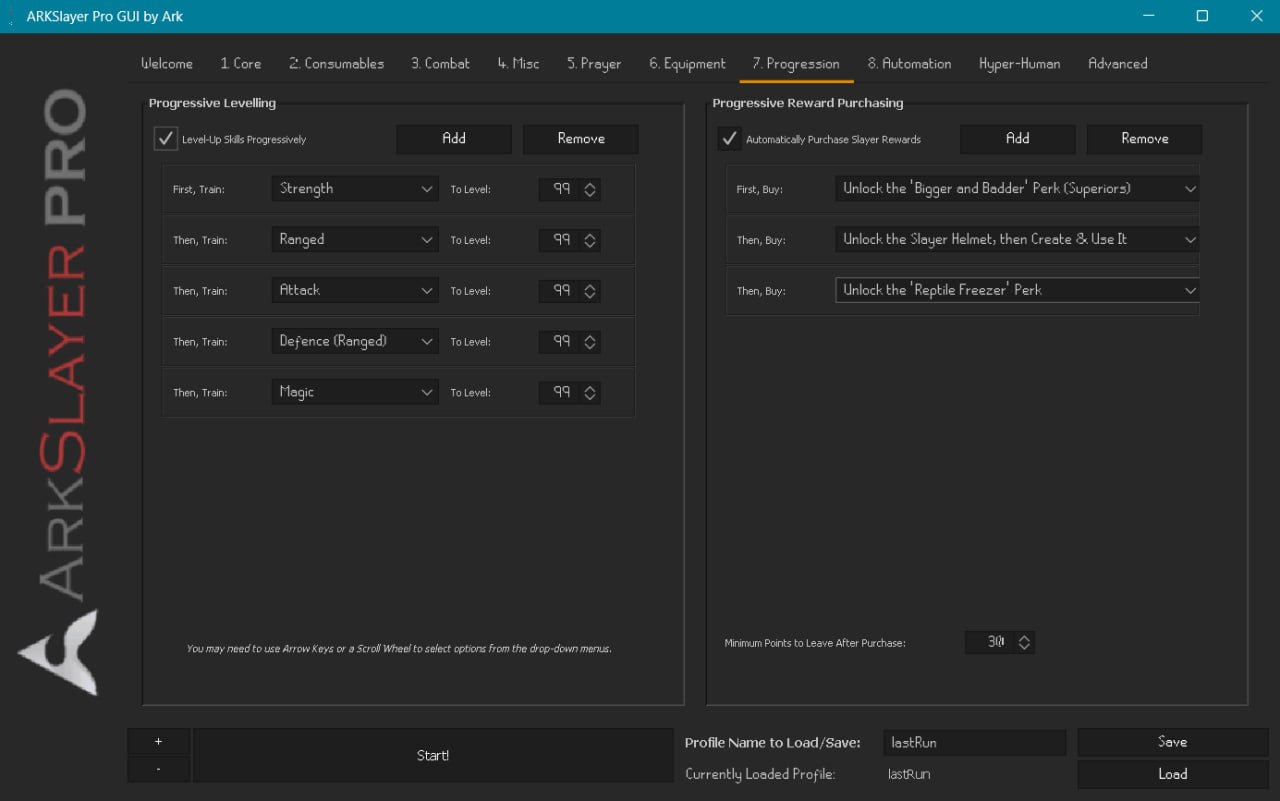
Controls skill progression and Slayer reward purchasing.
Progressive Levelling
When enabled, trains combat stats in a custom order. Each row specifies a skill and a target level. Once the target is reached, the script moves to the next row.
Example configuration:
| Order | Skill | Target |
|---|---|---|
| 1 | Strength | 99 |
| 2 | Ranged | 99 |
| 3 | Attack | 99 |
| 4 | Defence (Ranged) | 99 |
| 5 | Magic | 99 |
How it works: Between tasks, the script evaluates your stats against the plan, advances to the next row when the current target is met, and configures combat style accordingly. On pure mode, only Strength, Ranged, and Magic are available.
Progressive Reward Purchasing
When enabled, purchases Slayer rewards in the order configured.
Available rewards:
| Category | Rewards |
|---|---|
| Unlocks | Bigger & Badder (50 pts), Slayer Helmet (400 pts), Ring Bling, Gargoyle Smasher, Slug Salter, Reptile Freezer, Shroom Sprayer, Hot Stuff, Basilocked, Actual Vampire Slayer, Duly Noted, Stop the Wyvern, Hope You Mith Me, and more |
| Extensions | Ankou Very Much, Suq-a-nother One, Fire & Darkness, I Really Mith You, To Dust You Shall Return, Nechs Please, Augment My Abbies, Bleed Me Dry, Ada-mind Some More, Ruuuuune, It's Dark in Here, Smell Ya Later, Horrorific, Get Smashed, Basilonger, More at Stake, More Eyes Than Sense, and more |
Minimum Points to Leave After Purchase (default 300) - reserves Slayer Points for task skipping.
8. Automation Tab
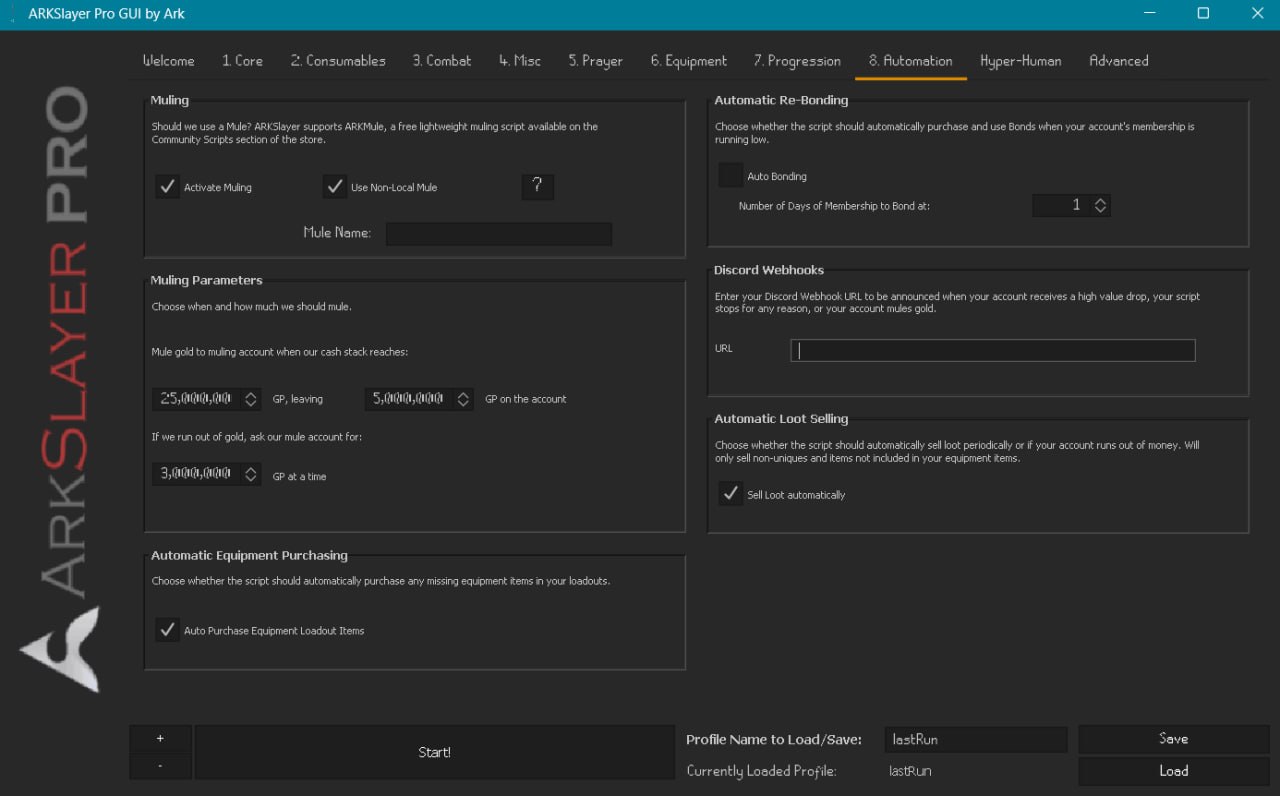
Controls muling, bonding, webhooks, and loot selling.
Muling - integrates with ARKMule
| Setting | Default | Description |
|---|---|---|
| Activate Muling | ON | Enables wealth transfer |
| Use Non-Local Mule | ON | Cross-machine muling - enter the mule account name |
| Port / ID | 1 | Identifies this account to the mule |
| Mule when cash exceeds | 10M | Sends excess to mule |
| Leave GP on account | 5M | Spending money for supplies |
| Request from mule when low | 2M | Requests gold if you run out |
Automatic Re-Bonding
When checked, purchases and uses Bonds to maintain membership. Set the minimum days remaining before bonding (default 1).
Discord Webhooks
Enter a webhook URL to receive notifications for:
- High-value loot drops
- Script starting / stopping
- Muling events
Automatic Loot Selling (default ON)
- Sells non-unique loot at the GE periodically or when you run out of cash
Automatic Equipment Purchasing (default ON)
- Buys missing gear at the GE (requires GE restocking enabled)
Hyper-Human Tab
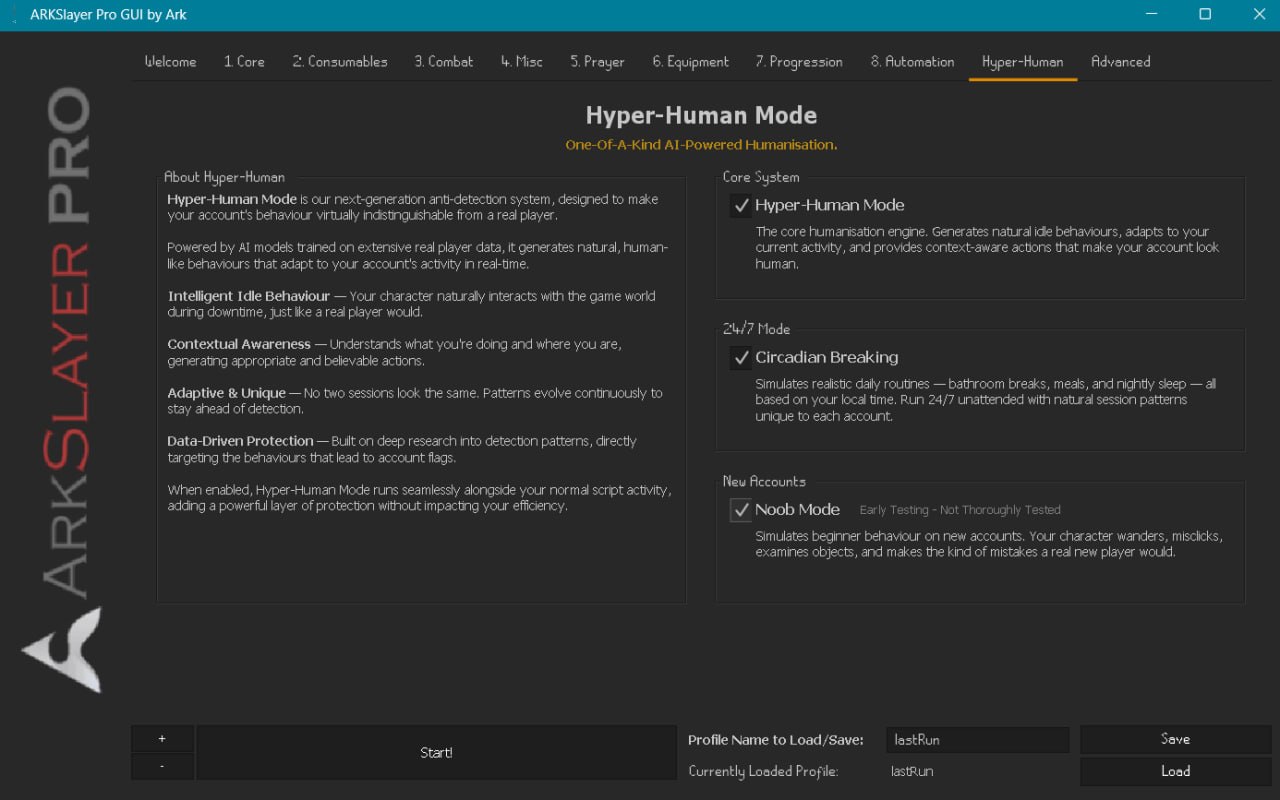
AI-powered humanisation engine. Hyper-Human Mode is enabled by default; Circadian Breaking and Noob Mode are opt-in.
| System | Description |
|---|---|
| Hyper-Human Mode | Core engine - models real player behaviour. Generates context-aware idle actions (examining items, hovering, camera adjustments, menu interaction) that adapt per account so no two sessions look the same |
| Circadian Breaking | For 24/7 operation. Simulates realistic daily routines - short breaks, meal breaks, sleep periods - based on local time |
| Noob Mode (Early Testing) | Beginner behaviour simulation - wandering, misclicks, examining objects. For brand-new accounts |
Why Hyper-Human is different: Traditional antiban uses randomised delays and occasional camera movements. Hyper-Human models real player behaviour patterns, generates context-appropriate idle actions, and adapts based on your account's activity history.
Advanced Tab - Gameplay Sub-Tab
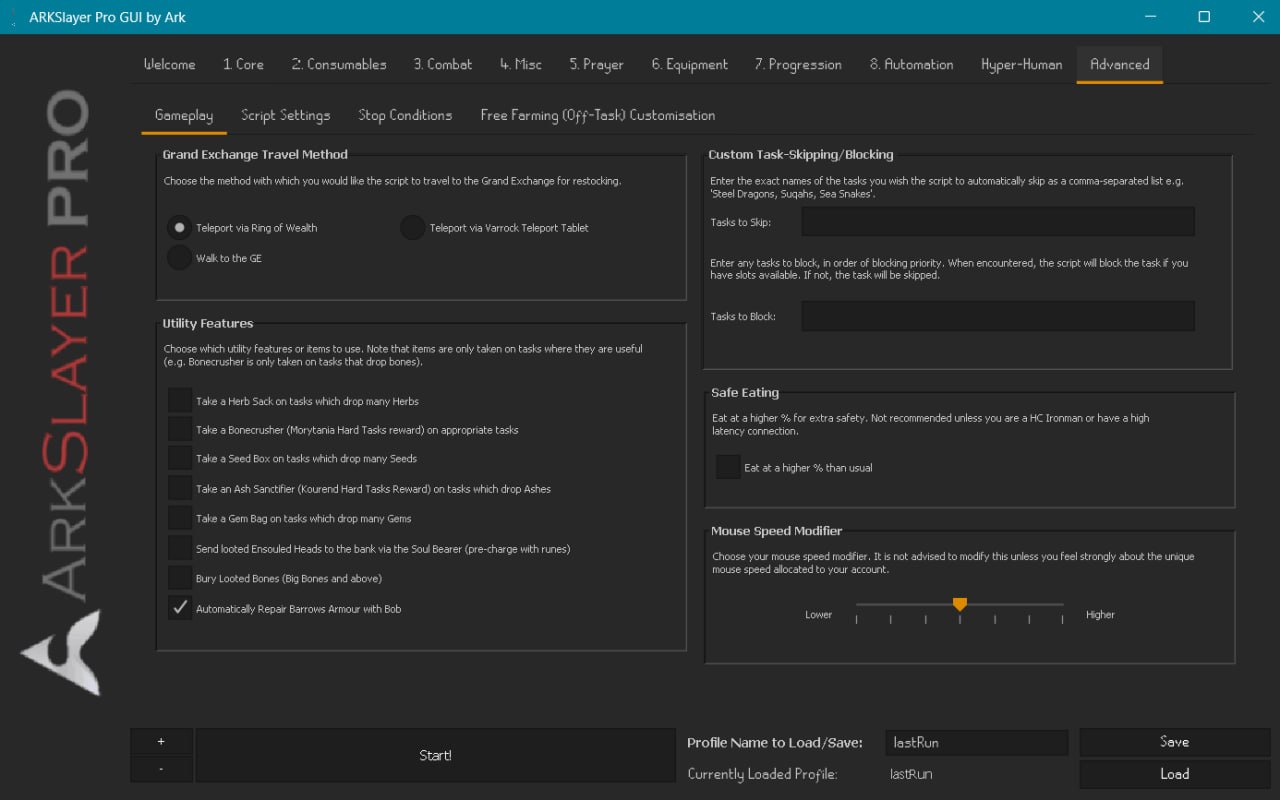
GE Travel Method (radio buttons)
| Method | Notes |
|---|---|
| Ring of Wealth (default) | Quick teleport to GE |
| Varrock Teleport Tablet | Alternative |
| Walk to GE | No items required |
Utility Features (checkboxes)
| Item | Effect |
|---|---|
| Herb Sack | Take on herb-dropping tasks |
| Bonecrusher | Morytania Hard - passive Prayer XP |
| Seed Box | Take on seed-dropping tasks |
| Ash Sanctifier | Kourend Hard - Prayer XP for ashes |
| Gem Bag | Take on gem-dropping tasks |
| Soul Bearer | Sends ensouled heads to bank (pre-charge with runes) |
| Bury Looted Bones | Automatically buries Big Bones and above |
| Auto-Repair Barrows | Repairs Barrows with Bob in Lumbridge |
Custom Task Skipping / Blocking
| Field | Description |
|---|---|
| Tasks to Skip | Comma-separated - script skips these using Slayer Points |
| Tasks to Block | Comma-separated - permanently blocks (costs points per slot) |
Safe Eating
- Eats at a higher HP threshold than usual
- Recommended for Hardcore Ironmen or high-latency connections
Advanced Tab - Script Settings Sub-Tab
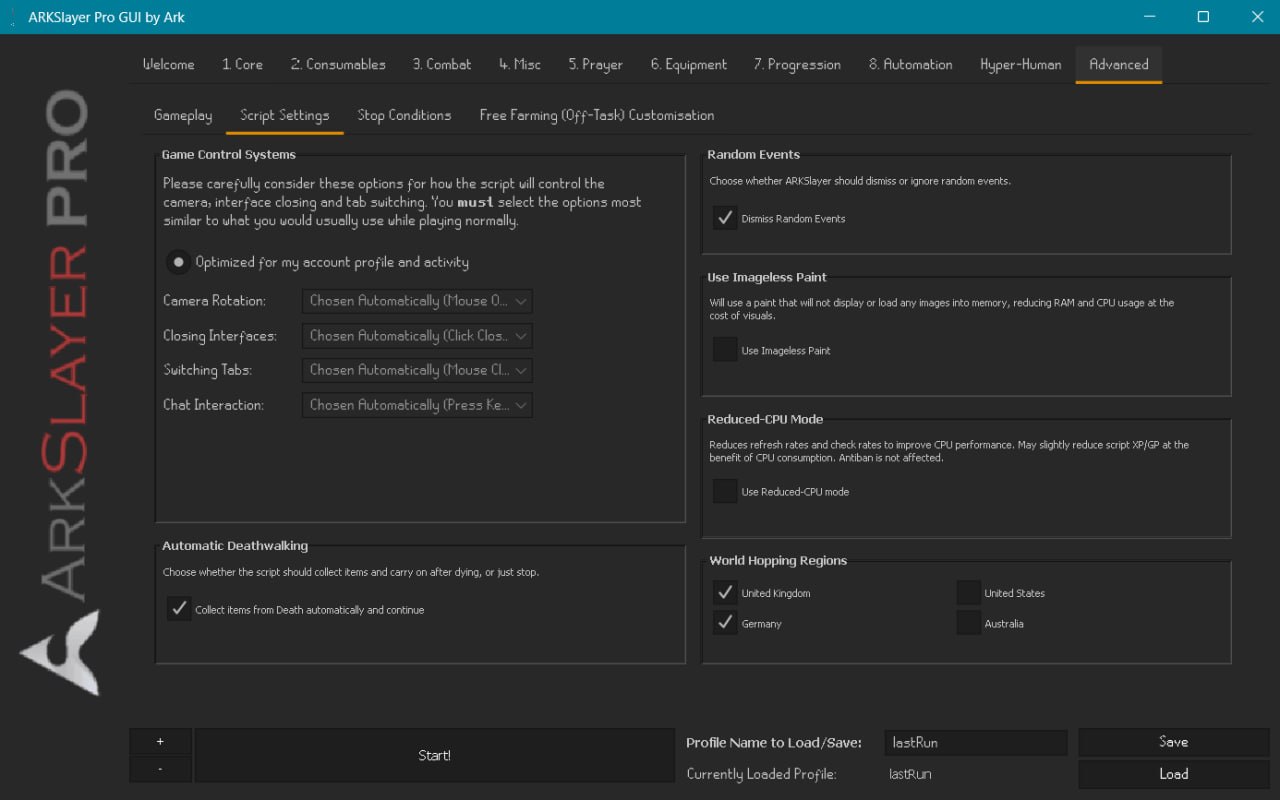
Game Control Systems
The default ("Optimized for my account profile and activity") auto-selects the best interaction methods. Individual dropdowns for fine-tuning:
| Setting | Description |
|---|---|
| Camera Rotation | Mouse / Keyboard / Combination |
| Closing Interfaces | How interfaces are dismissed |
| Switching Tabs | How game tabs are switched |
| Chat Interaction | How chat is handled |
Other Settings
| Setting | Default | Description |
|---|---|---|
| Automatic Deathwalking | ON | Collects items from Death and continues after dying |
| Dismiss Random Events | ON | Responds to random events |
| Imageless Paint | OFF | Reduces RAM/CPU by disabling paint images |
| Reduced-CPU Mode | OFF | Lowers refresh rates - may slightly reduce XP/GP but helps multi-account setups |
| World Hopping Regions | UK, Germany, US, Australia | Select which server regions to hop between (all enabled by default) |
Advanced Tab - Stop Conditions Sub-Tab
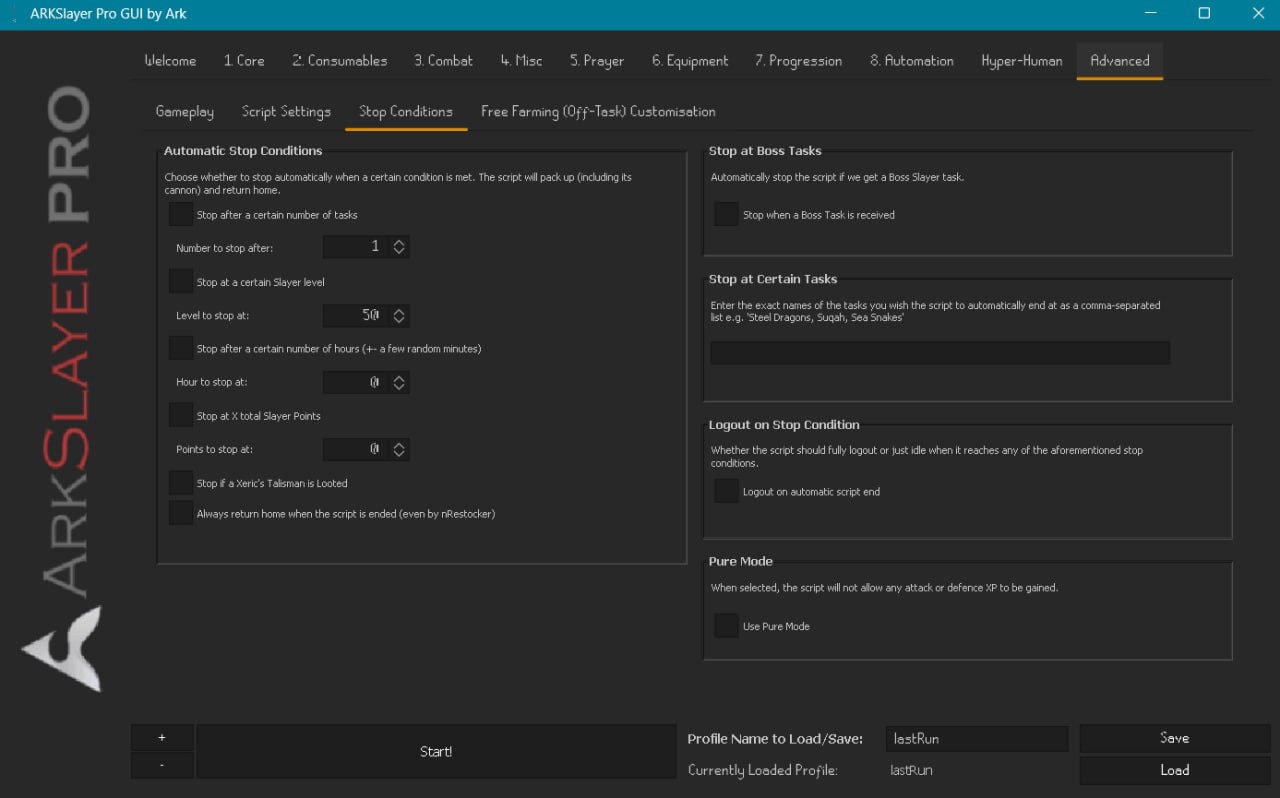
Automatic Stop Conditions (checkboxes, multi-select)
| Condition | Description |
|---|---|
| Stop after X tasks | Completes N tasks then stops |
| Stop at Slayer level | Reaches target level then stops |
| Stop after X hours | Stops after approximately N hours (± random minutes) |
| Stop at X Slayer Points | Stops when total points reach the threshold |
| Stop if Xeric's Talisman looted | Stops on this rare drop |
| Always return home | Returns to bank before stopping |
Stop at Boss Tasks - stops if assigned a boss task
Stop at Certain Tasks - comma-separated list of tasks to stop on
Logout on Stop Condition - fully logs out (off = idles until natural logout)
Pure Mode - prevents Attack or Defence XP (for 1 Defence / pure accounts)
Advanced Tab - Free Farming Customisation Sub-Tab
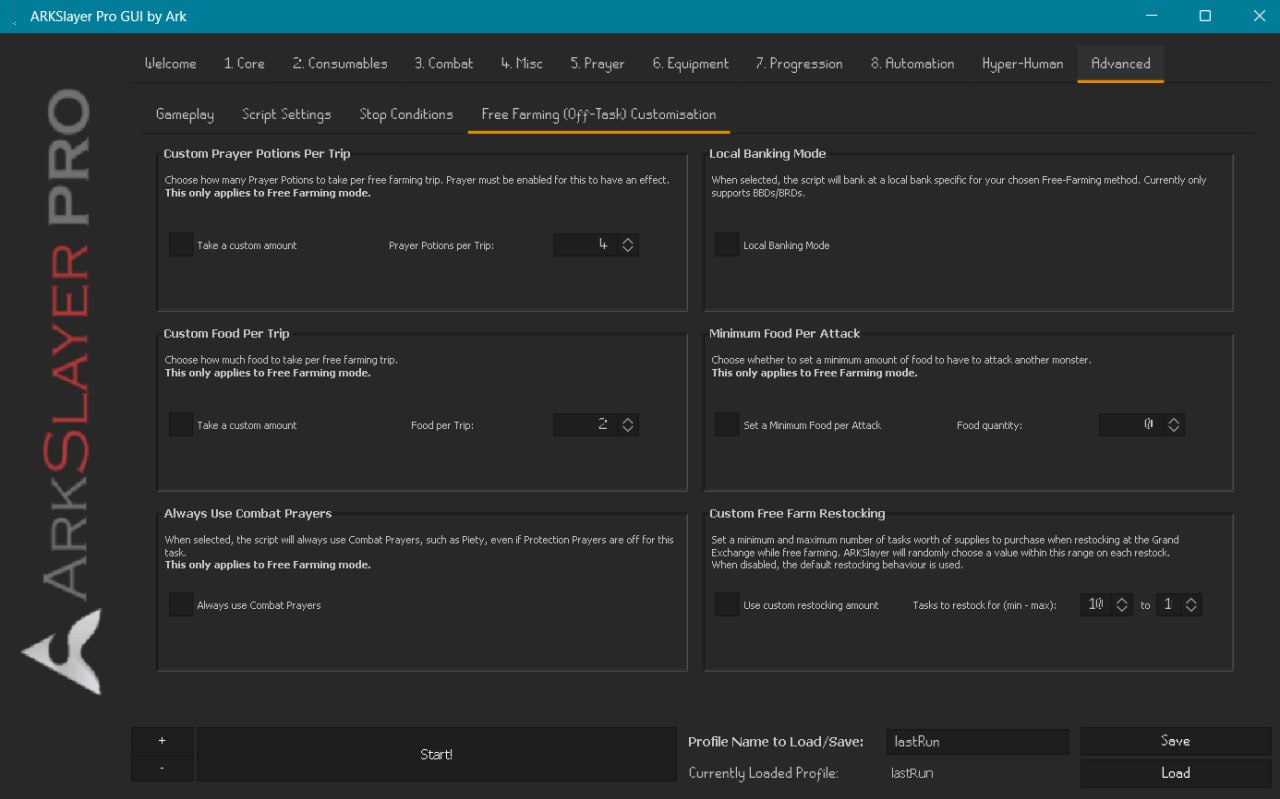
These settings only apply to Free Farming mode (selected in the Core tab).
| Setting | Description |
|---|---|
| Custom Prayer Pots Per Trip | Override prayer potion quantity |
| Local Banking Mode | Use nearby bank (currently BBDs / BRDs only) |
| Custom Food Per Trip | Override food quantity |
| Minimum Food Per Attack | Minimum food before attacking another monster |
| Always Use Combat Prayers | Enforces Piety/Rigour etc. even if protection prayers are off |
| Custom Restocking Amount | Min/max task range for GE restocking |
Using Arguments
ARKSlayer supports loading saved GUI profiles via script arguments.
- Save a profile in the GUI using the profile name text field and Save button
- Start with that profile by entering the name in the arguments field (right-click → "Start with config")
- The script starts immediately - skips the GUI entirely
To re-use your last configuration, enter lastRun (case-sensitive).
Useful for multi-account setups where you want consistent configurations without manual GUI interaction.
Reading the Paint
ARKSlayer uses an interactive, tabbed paint overlay. Click the tabs on the left side to switch views.
Main Tab
| Stat | Description |
|---|---|
| Runtime | How long the script has been running |
| Current Task | Monster, location, kills remaining |
| Tasks Completed | Total tasks finished this session |
| Slayer XP/hour | XP rate for Slayer |
| Total XP/hour | Combined combat XP rate |
| Profit / Loss | GP/hour |
| Slayer Points | Points gained and points/hour |
| Cannon Status | Active / inactive (if applicable) |
Experience Tab
- Experience gained in each combat skill
- XP/hour breakdown per skill
Loot Tab
- Total loot value (itemised)
- Total spent on supplies
- Net profit / loss
- Loot value per hour
Task Skipping & Blocking
ARKSlayer supports almost every task assignable by the supported Slayer Masters. When an unsupported or undesirable task is assigned, the script skips it using Slayer Points (30 points per skip).
Recommended Block List
Blocking costs Slayer Points (scales with Quest Points) but prevents the task from ever being assigned again.
Vannaka
| Task | Why to Block |
|---|---|
| Infernal Mages | Hit hard with magic, low XP, cannot be cannoned, slow to reach in Canifis Slayer Tower |
| Jellies | Difficult for melee (magic-based melee attack), long walk from bank |
Nieve / Steve
| Task | Why to Block |
|---|---|
| Steel Dragons / Iron Dragons | Very high defence, deep in Brimhaven Dungeon, low profit |
| Black Demons | Requires prayer, poor drops, mediocre XP |
Duradel
| Task | Why to Block |
|---|---|
| Mithril Dragons (if unlocked) | Very difficult, low XP/hour |
All Masters
| Task | Why to Block |
|---|---|
| Spiritual Warriors | GWD only - high-risk area for a bot, automatically skipped |
Custom Task Skipping
In the Advanced → Gameplay tab, you can enter additional tasks to skip (uses Slayer Points) or block (permanent).
The Optimal Goldfarming Build
If you want to create an account for farming high-value Slayer monsters:
Essential Requirements
| Requirement | Why |
|---|---|
| Dwarf Cannon quest | Cannon access |
| 43 Prayer (Restless Ghost) | Protection prayers |
| Priest in Peril → Nature Spirit → Lost City → Fairytale I | Fairy rings |
| Black Mask (~750k) | 16.67% damage bonus |
| Dragon Dagger(p++) | Special attacks (requires Lost City) |
| ~15M starting capital | Supplies and cannonballs |
Recommended Extras
- Horror from the Deep - Dagannoth tasks
- Fremennik Isles - Ice Trolls (massive XP)
- Do NOT complete Dragon Slayer - keeps green/blue dragon tasks available
- Purchase Malevolent Masquerade (Slayer Helmet) as a priority
- Purchase Bigger and Badder for superior monsters
Suggested Reward Order
- Bigger & Badder (Superiors)
- Malevolent Masquerade (Slayer Helmet)
- Hot Stuff (if using Nieve)
- Extend Bloodveld and Aberrant Spectre tasks
- Extend Ankou
Expected Progression
| Slayer Level | Milestone | Timeframe | GP/Hour |
|---|---|---|---|
| 55 | Turoth | ~6 days | 250-300k |
| 65 | Dust Devils | ~10 days | 300k |
| 70 | Kurask | ~12 days | 600-700k |
| 72 | Skeletal Wyverns | ~14 days | 500-700k |
| 75 | Gargoyles | ~16 days | 500-700k |
| 77 | Brutal Black Dragons | ~20 days | 800k+ |
| 80 | Nechryael | ~25 days | 600k+ |
| 85 | Abyssal Demons | ~1 month | 1M+ |
Slayer breaks even financially at level 60, turns profitable at 70, and is one of the best money-makers above 80. All of these monsters can be farmed automatically using ARKSlayer's Free Farm feature.
Ironman Mode
ARKSlayer has full Ironman support. When Ironman mode is activated in the Core tab:
- GE restocking is disabled - relies on Slayer Shop Purchasing and banked supplies
- Teleport routing switches to rune-based methods - Law runes, Air runes, Fire runes for Varrock Teleport; Rings of Duelling, Games Necklaces, and other obtainable items
- "Only loot our drops" is automatically enabled
- Stops automatically when it needs an item you don't have - preventing dangerous situations
Essential Items
Teleportation (highly recommended)
| Item | Use |
|---|---|
| Dramen staff / Lunar staff | Fairy rings |
| Slayer ring | Slayer locations |
| Ring of duelling | Banking (Ferox / Castle Wars) |
| Games necklace | Various teleports |
| Law / Air / Fire / Water / Earth runes | Standard teleports |
| House teletabs | POH banking (if using) |
Task Items
| Item | Used For |
|---|---|
| Mirror Shield | Basilisks, Cockatrice |
| Nose Peg | Aberrant Spectres |
| Earmuffs | Banshees |
| Face Mask | Dust Devils |
| Boots of Stone | Gargoyles |
| Spiked Helmet | Wall Beasts |
| Insulated Boots | Kraken |
| Leaf-Bladed weapon | Kurasks / Turoths |
| Rock Hammer | Gargoyles |
| Anti-dragon shield | Dragon tasks (if Dragon Slayer done) |
| Ice coolers / Salt / Fishing Explosives / Fungicide | Specific kill moves |
| Light source, Tinderbox, Rope, Spade | General exploration |
| Coins | Slayer Masters and shops |
| Antipoison | Poisonous monsters |
Account Protection
Account safety is a core priority of ARKSlayer's design. While no bot can guarantee immunity from bans, ARKSlayer employs extensive anti-profiling measures.
Anti-Profiling by Design
Script actions are implemented through multiple different code paths - item banking orders, quantities, GE purchase prices, potion drinking levels, special attack timing, reaction times, and camera movements are all randomised per account using seeded algorithms. No two accounts carry out actions identically.
- Every account has unique behaviour patterns - generated from seed values tied to your account name
- Actions are never repetitive - the same situation can resolve differently each time
- Session patterns evolve - behaviour changes over time rather than following fixed loops
Best Practices
- Moderate your botting hours - 4-6 hours per day is safer than 24/7; if you run longer, understand that inhuman playtime is itself a risk factor
- Enable the extra antiban features - Micro-breaking, Fatigue, Hyper-AFK, and Periodic World Hopping improve your safety profile at a small XP cost
- Use Circadian Breaking for 24/7 operation - simulates realistic daily routines
- Manual play between botting sessions helps break tracking patterns
Built-in Safety Systems
- Deathwalking to recover items after death
- Repeated-action failsafe detection - detects and recovers from stuck states
- Combat-area resetting if dragged out of the area
- Area-locked looting to prevent lure-based traps
- World-hopping when too many players arrive or someone sets up a cannon in your spot
Need Help?
Found a bug, or have a question this guide does not answer? The fastest way to get support is the ArkScripts Discord - drop a message and we will help you out.
ARKSlayer Pro is constantly evolving. Check the script thread and the in-GUI tooltips for the most up-to-date information about new features and changes.
Thank you for choosing ARKSlayer Pro. Happy botting and stay safe!